
Build Professional cTrader Tools Without Coding
Create cBots, indicators, dashboards and trading terminals using plain English. Trader View is designed for traders. Coder View gives developers full source control.
Create your account to claim £5 in free AI credit. Available to eligible new users, valid for 48 hours after your first successful login.
Describe what you want to build.
Everything You Need to Build Professional cTrader Tools
Build, validate, analyse, optimise and deploy professional cTrader tools with AI.
Build Without Coding
Create cBots, indicators, dashboards and trading terminals using plain English. Xen generates the cTrader code for you.
Validate Requirements
Check requested features for gaps, contradictions, missing logic and trading risks before continuing.
Backtest Analysis
Upload cTrader backtest reports and let Xen explain performance, weaknesses and next improvement steps.
Optimize Strategies
Use cTrader’s optimisation engine, then ask Xen to analyse settings, robustness and parameter behaviour.
Deploy to cTrader
Build and download compiled .algo files, then launch your cBots and indicators directly in cTrader.
Build from Images
Upload screenshots of trading panels, dashboards or interface concepts and let Xen recreate them as professional cTrader tools.
Two Views. One Platform.
Use Trader View when you want results without code. Switch to Coder View when you need full technical control.
Trader View
Build cBots, indicators, dashboards and plugins using plain English. Xen guides every step, validates builds and keeps technical details out of the way.
Try Trader View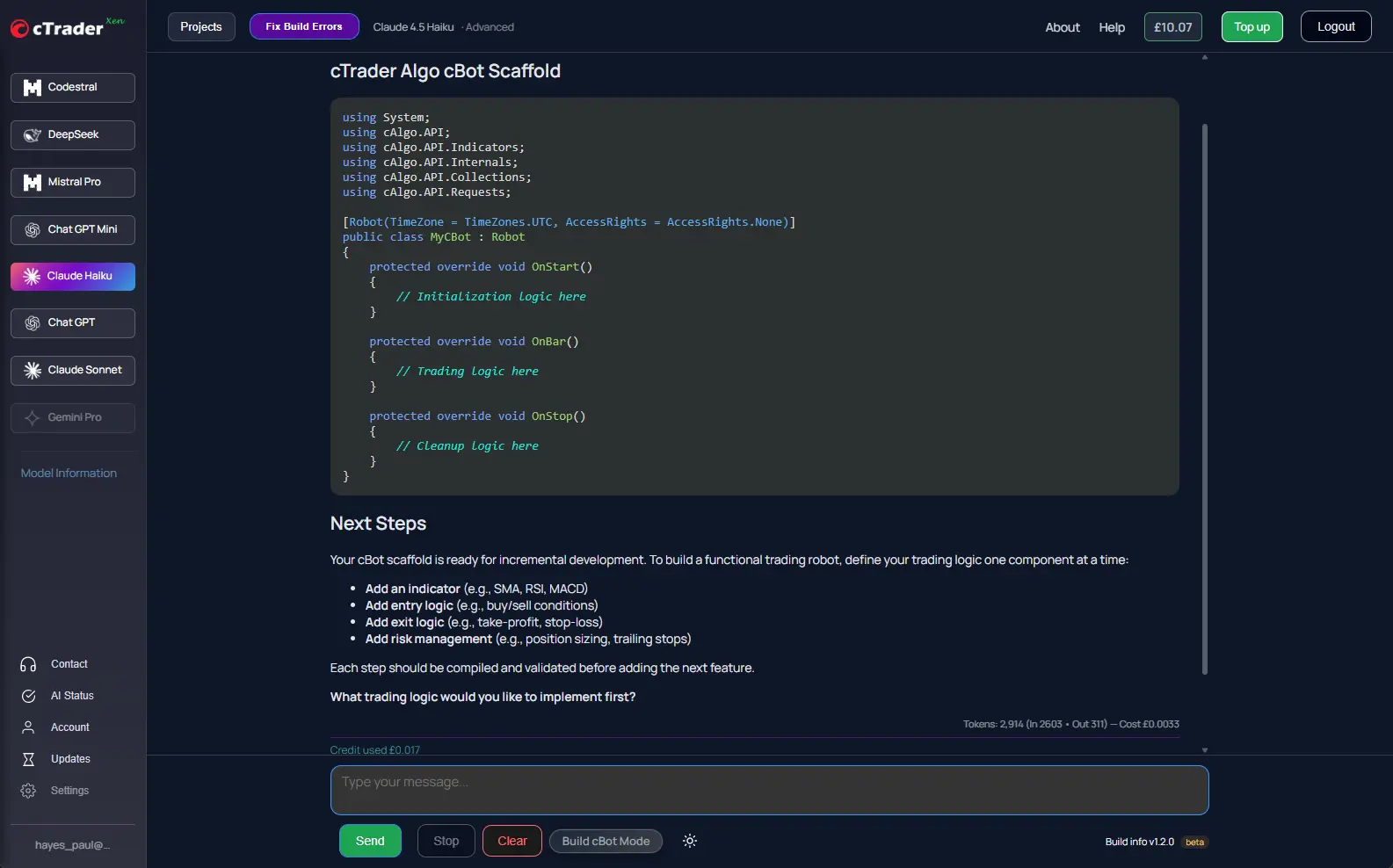
Coder View
View full C# source, compare project versions, inspect build errors, repair code with AI and export production-ready projects.
Try Coder View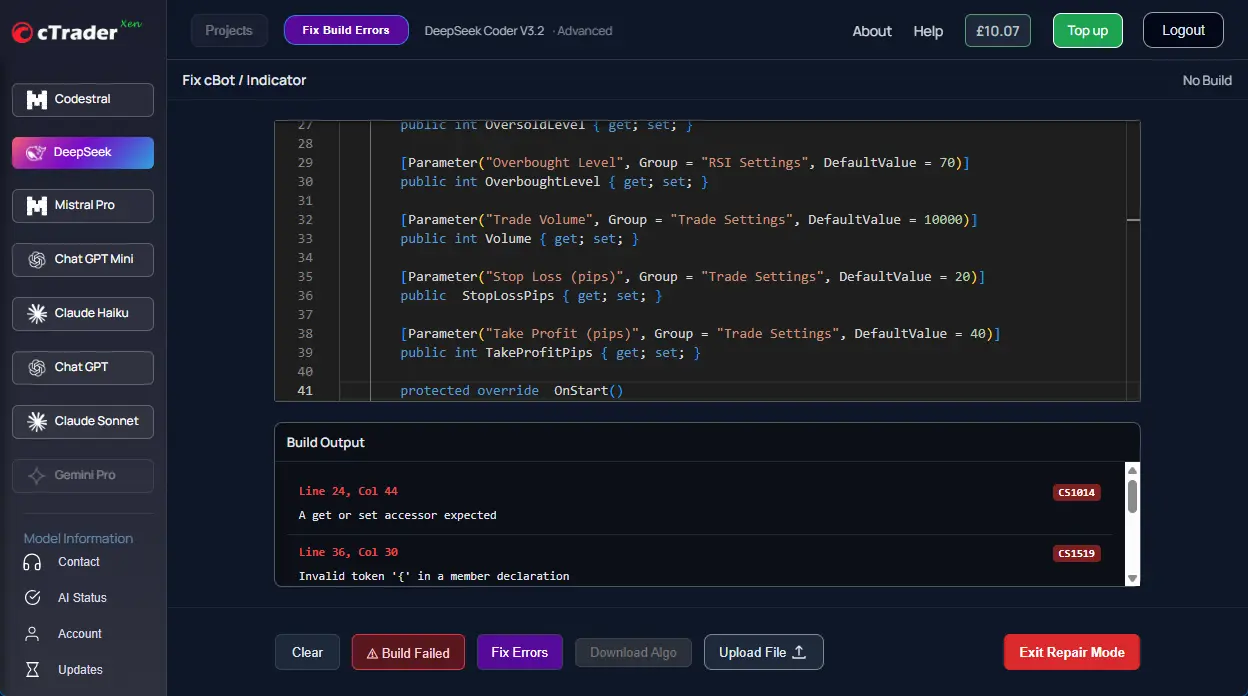
From Idea to Execution in 4 Steps
Xen keeps the workflow structured so you can build in stages, test properly and improve based on evidence.
Describe Your Project
Tell Xen what you want to build in plain English.
Validate & Refine
Check requirements, identify gaps and improve the specification.
Backtest & Optimize
Use cTrader backtesting and optimisation, then analyse results with Xen.
Build & Deploy
Download your cBot or indicator and launch it in cTrader.
Turn Your Trading Idea Into Better Xen Prompts
Not sure how to describe your cTrader project? The cTrader AI Prompt Builder helps transform your idea into a sequence of focused development prompts that you can submit to Xen one step at a time.
Plan Before Building
Describe your trading idea in plain English and create a structured build sequence before starting development in Xen.
Build in Stages
Each prompt focuses on one development step, making it easier to build, test and improve your cTrader tool.
Designed for Xen AI
The Prompt Builder creates prompts specifically designed for Xen's iterative cTrader development workflow.
Choose the Best AI Model
Choose the AI model that best matches your workflow, whether you prioritise speed, advanced reasoning or maximum coding performance.
 GPT 6 Luna
GPT 6 Sol
GPT 6 Luna
GPT 6 Sol
 Claude Sonnet
Claude Opus
ChatGPT Luna
Claude Sonnet
Claude Opus
ChatGPT Luna
 DeepSeek Pro
Simple Pay-As-You-Go Pricing.
Start with £5 in free AI credit when you create an account. Available to eligible new users, valid for 48 hours after your first successful login. Then top up from just £1, with no subscription or monthly commitment.

Build, Verify and Deploy with Confidence
Unlike generic AI assistants, Xen helps prepare your cTrader projects for real use by validating requirements, compiling generated code and repairing build errors before deployment.
Validate Before You Build
Review trading requirements before code generation. Xen identifies missing logic, contradictions, ambiguous behaviour and potential trading risks before development begins.
Build Verification
Compile generated cBots and indicators directly from Xen. Build verification detects compiler errors before you import your project into cTrader.
AI Build Repair
If compilation fails, Xen analyses the build output, explains the problem and uses AI to repair the code automatically, helping you reach a successful build faster.
Over 10 Years Building Professional cTrader Tools
Developed by ClickAlgo, a trusted cTrader solution provider since 2014, helping thousands of traders and developers build professional trading software.
Frequently Asked Questions
Common questions about building cTrader tools with Xen AI.
Do I need programming experience?
No. Trader View allows you to build cBots, indicators, dashboards and other cTrader tools using plain English.
Which AI models are available?
Xen supports leading AI models including GPT 6 Sol, GPT 6 Luna and Claude Opus. Choose the model that best suits your workflow and budget.
Can I edit the generated source code?
Yes. Switch to Coder View to access the complete C# source code, download projects and continue development manually if required.
Can Xen fix build errors?
Yes. Xen can compile generated code, detect compiler errors and use AI-powered build repair to resolve many issues automatically.
Is there a free trial?
Yes. Create an account to claim £5 in free AI credit and try Xen before buying credits. The offer is available to eligible new users, and the credit is valid for 48 hours after your first successful login.
How does pricing work?
Xen uses simple pay-as-you-go pricing. You can top up from just £1, with no monthly subscription or long-term commitment.
Can I use Xen for existing projects?
Yes. You can continue improving existing cTrader cBots and indicators, analyse backtests, optimise strategies and refine projects over multiple AI sessions.
Try cTrader Xen with £5 Free AI Credit
Create your account and start building your cTrader tools. Free credit is available to eligible new users for 48 hours after their first successful login.